Navigation and pathfinding
Navigation (AKA pathfinding)
Section titled “Navigation (AKA pathfinding)”- This page has some helpful troubleshooting information, e.g. if your agent is jittering or can’t reach its destination.
- You shouldn’t set the
TargetPositionevery single frame. I’m not totally sure how you should make an enemy chase the player if the player is constantly moving. Maybe just request a new path every 0.5 seconds? - If you’re getting stuck on a corner, consider setting PathDesiredDistance and TargetDesiredDistance higher. It’s possible that your agent’s velocity is higher than the desired distance.
- You shouldn’t set the
NavigationRegion2Dworks by making polygonal regions that indicate walkability. If you want an obstacle, you actually have to cut out a portion of that region. Godot can handle this for you, but it’s not super obvious how, and it’s apparently changing from 4.2 → 4.3, so I’ll just write some quick notes:- To add an obstacle to a tilemap, you need a
NavigationRegion2Dwith its Source Geometry Mode set to something like Group Explicit. By doing this, you can add meshes and static colliders to a named group and they’ll be removed from the nav mesh (that way you don’t need the meshes and colliders to be children of the navigation region). Just keep in mind that the colliders need to beStaticBody2Dinstances, notRigidBody2D; the point is that they’re not allowed to move since moving them would require rebaking the mesh. TheStaticBody2Dcan be anywhere in the scene tree, but it needs a global group added to it. The parents of theStaticBody2Ddon’t need that label.
- To add an obstacle to a tilemap, you need a
- Keep in mind that navigation is not the same as collision. This means that if your character is too close to walls, for example, that collision shapes won’t change anything.
Common 2D navigation setup
Section titled “Common 2D navigation setup”NavigationAgent2D computes paths based on a single, infinitely small point. That point is the immediate parent’s global position. A good scene hierarchy looks like this:
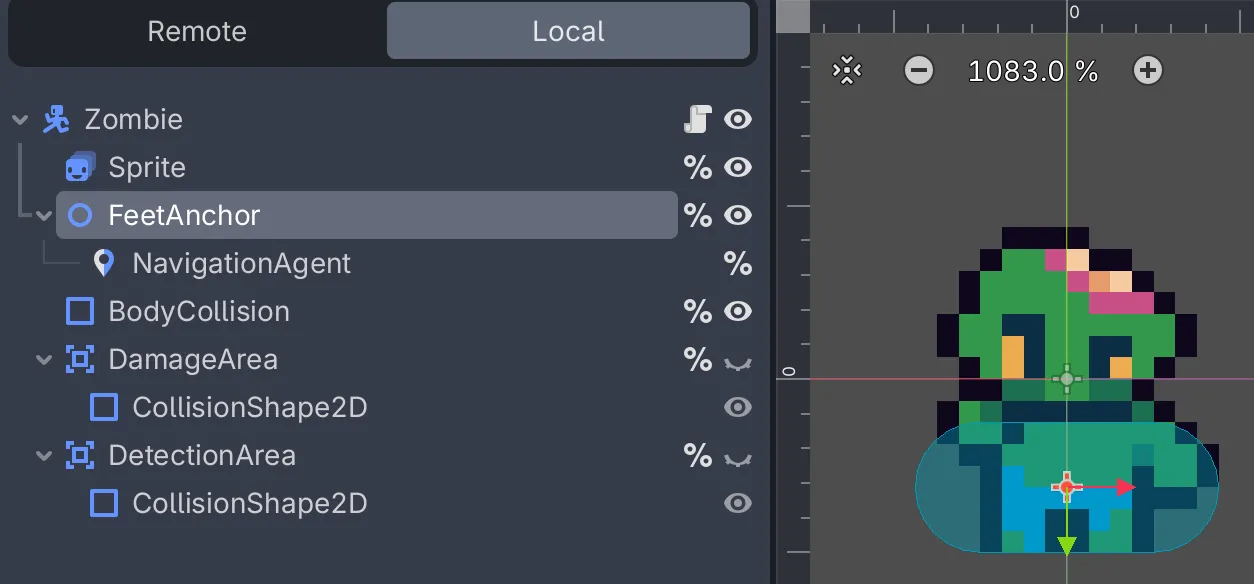
As shown above, we put NavigationAgent in a special node, FeetAnchor. That way, paths are calculated using the foot position. However, you may still need your own code to use this position, e.g.:
var offsetToNextPathPosition = nextPathPosition - _feetAnchor.GlobalPosition;if (offsetToNextPathPosition.IsZeroApprox()){ // reached immediate destination}Navigation is not aware of your collision shapes! Attempting to change NavigationAgent2D to work around collision is pointless; the Godot docs explicitly say “avoidance does not affect the pathfinding!” Instead, you would change your NavigationRegion2D’s agent_radius. If you have multiple entities with different collision sizes, you should bake multiple NavigationRegion2Ds and have your agents consult the correct region for their collision size.
Note: the reason why BodyCollision in the prior screenshot is around the zombie’s lower half is so that they overlap convincingly with obstacles: 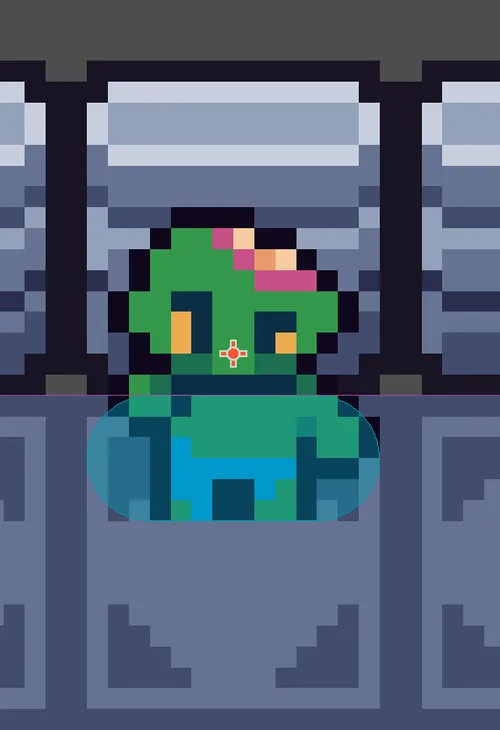
Their head is technically “in” the wall, but that’s okay, because their foot collider isn’t overlapping the wall. Y-sorting or Z-indexes makes the zombie look like it’s on top of the wall, which gives an illusion of depth.
As mentioned above, you should have different NavigationRegion2D’s based on entity sizes, then set their agent_radius properties appropriately. Here are some examples, but only agent_radius == 7 works for this particular setup:
agent_radius == 1-
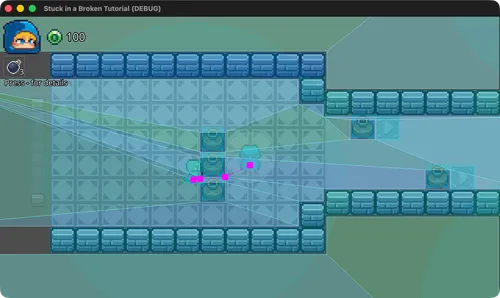
- ❌ The zombie on the left is trying to path through the vases to the player (since there’s a small gap between vases), so they get stuck because their collider is too big for them to fit.
-
agent_radius == 4-
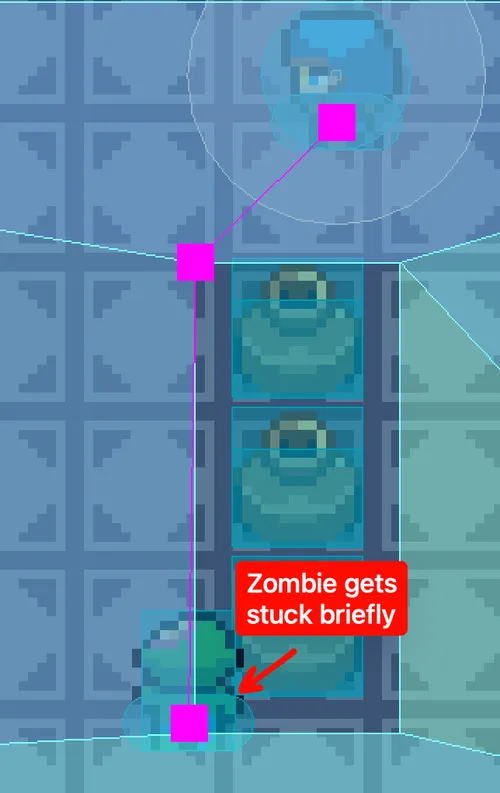
- ❌ The zombie gets stuck on the corners (sometimes permanently). You can see right in the picture that the zombie’s capsule is too close to the vases, meaning the radius isn’t big enough.
-
agent_radius == 7-
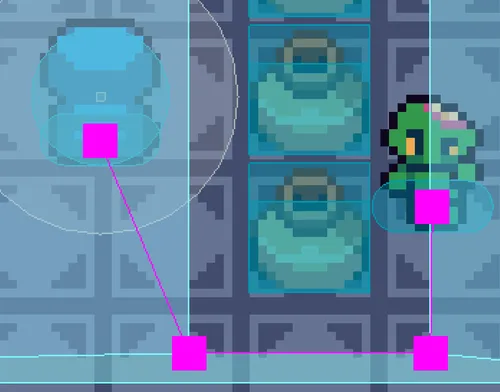
- ✅ The zombie’s collision box (a capsule with
height == 14) doesn’t overlap with the vase.
-
agent_radius == 8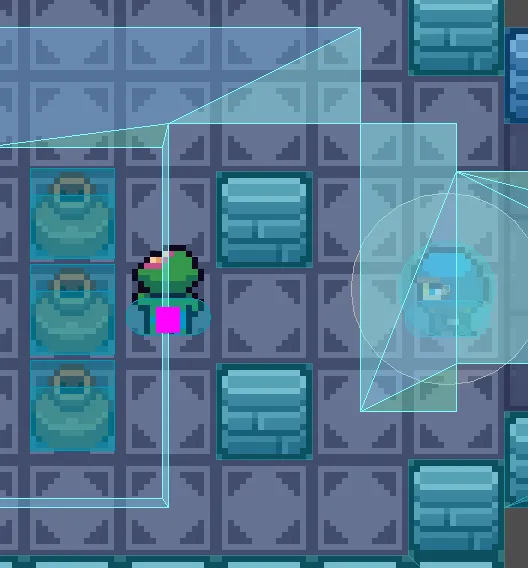
- ❌ The tilesize is 16x16, meaning a radius of 8 needs to expand collision around any given wall by 8 pixels. This makes one-tile gaps impassable. The zombie can never reach the player where they currently are.
- In addition, you can see that zombies can’t get all that close to obstacles. They’re as close as they can get to the vases on their left, which feels strange in an actual game since they should be able to touch.
Conclusions:
- Setting your radius too small will make entities get stuck (especially on corners).
- Setting your radius too large will prevent entities from taking certain paths. Even setting the radius to half of your tilesize makes one-tile gaps impassable.