Yarn Spinner
Overview
Section titled “Overview”Yarn Spinner is a dialogue-control system with related tools that works for Unity and Godot.
For me, the main benefit steering me toward tooling like this is ergonomics. With Skeleseller, we had an unwieldy system to add new text (it was roughly one class per line of dialogue 😳). With Yarn Spinner, you can separate your dialogue from your code. This is nice for iterating on dialogue without having to rebuild.
It’s also nice not to have to make everything from scratch. 🙂
Links:
- Browser playground for dialogue
- This is really useful for testing
.yarnscripts - Scripting reference
- This is really useful for testing
- GitHub
- Centralized issue repo
- They have several other repos (see below), but they use this one to consolidate any issues that show up.
- Core Yarn Spinner project
- This is engine-agnostic. It contains the VM code.
- Godot - C# GitHub repo
- Docs - this is the only Godot-specific section, so you can’t just search for things or you’ll find the Unity equivalents.
- Godot - GDScript GitHub repo
- Centralized issue repo
- VSCode extension - this is apparently pretty helpful, but I haven’t tried it yet myself
Alternatives:
- Dialogue Manager
- Dialogic 2 - C# is supported but this was coded in GDScript
One-line notes
Section titled “One-line notes”- A node in the context of Yarn Spinner is essentially just a dialogue block. Any time you have a
jumpcall in your script, it’s jumping to a node.- If you want to detect from code when you’ve changed nodes, you can define
OnNodeEnterandOnNodeExit(reference).
- If you want to detect from code when you’ve changed nodes, you can define
- It appears as though Godot doesn’t have full support for voiceovers. E.g. when using the Godot Inspector to look at a
.yarnproject, you don’t even have the “assets” folders in the UI like Unity does (although the underlying.yarnprojectfile does have the right structure).- If you do want voiceovers, I think it’s easy enough to figure out how to do it yourself using this page and the Unity codebase.
- Follow these instructions. They’re easy to follow but involve some non-standard steps like modifying your
.csprojfile.- Updating the library is the same; just clone from GitHub and copy into your project.
- I personally don’t need YSLS files (presumably “Yarn Spinner Language Server”) as mentioned in this release, so I disabled it with
YARN_SOURCE_GENERATION_DISABLE_YSLSin my.csprojfile. The presence of the YSLS files annoyed me because changes to my code would trigger changes in that file (so that Yarn Spinner knows which functions I was using).- Actually, I disabled all source generation thanks to this issue (i.e. just change the
YARN_SOURCE_GENERATION_DISABLE_YSLSin the.csprojfile toYARN_SOURCE_GENERATION_DISABLE_ALL). This prevents you from using all functions annotated withYarnCommand, including the built-inWait. You can still register them yourself via_runner.AddCommandHandler("wait", DefaultActions.Wait);- Doing this sped up my clean builds (after accumulating 4 months’ worth of code) from ~3.5s to ~2.5s.
- Note that specifically with
DefaultActions.Wait, you probably want a custom implementation that doesawait tree.ToSignal(tree.CreateTimer(duration, processAlways: false), SceneTreeTimer.SignalName.Timeout);, that way it gets paused when you pause your game; I ran into an issue in SiaBT where you could interrupt a dialog mid-waitby pausing, then thewaitwould still run and eventually present dialogue options, which would steal the focus from the pause menu.
- Actually, I disabled all source generation thanks to this issue (i.e. just change the
Script language reference (reference)
Section titled “Script language reference (reference)”- Disabling an option: add
<<if false>>at the end of it, e.g.-> Yes <<if false>>- Note: Yarn Spinner calls this an “unavailable” option and you can choose to show it or not in your
OptionsPresenter.
- Note: Yarn Spinner calls this an “unavailable” option and you can choose to show it or not in your
- Hiding an option: wrap the whole thing in
<<if false>>and<<endif>>
Setting and getting variables from code
Section titled “Setting and getting variables from code”// SettingyourDialogueRunner.VariableStorage.SetValue("$has_key", true);
// GettingyourDialogueRunner.VariableStorage.TryGetValue<bool>("$has_key", out var b))Conditionally hiding and disabling
Section titled “Conditionally hiding and disabling”Yarn Spinner only has the option out of the box to mark an option “unavailable” if <<false>> appears after the option (after evaluation). You can decide whether “unavailable” means hidden or disabled. If you want both at once within a set of options, then you can use metadata to look up a variable at runtime.
E.g. here’s a script in which the first option always shows, but the second one is both conditionally disabled and conditionally hidden:
title: BeforeGoingToCommunityCenter--- -> Let's go <<jump GoToCommunityCenter>> -> Wait... <<if $has_chosen_wait == false>> #hideIf:has_chosen_scary <<jump WaitBeforeGoing>>===How to accomplish this:
- Make a custom
OptionsPresenter - In
RunOptionsAsync, add code like this:
public async YarnTask<DialogueOption?> RunOptionsAsync(DialogueOption[] dialogueOptions,    CancellationToken cancellationToken){  // (lines omitted for brevity)  optionView.Visible = !ShouldForceHide(option);  // (lines omitted for brevity)}
private bool ShouldForceHide(DialogueOption option){    foreach (var tag in option.Line.Metadata)    {        if (!tag.StartsWith(HideIfTagPrefix, StringComparison.InvariantCulture))        {            continue;        }
        var varName = $"${tag[HideIfTagPrefix.Length..]}";
        if (_dialogueRunner.VariableStorage.TryGetValue<bool>(varName, out var b))        {            return b;        }
        return false;    }
    return false;}
LinePresenter
Section titled “LinePresenter”If you want to listen to events (e.g. OnPrepareForLine, OnCharacterWillAppear), they’re implemented as function calls instead of delegates or signals.
- Make a new class that inherits from
ActionMarkupHandler - Fill out any functions that you’re interested in.
- Click your
LinePresenterin Godot and changeeventHandlersto include your class.
Conditionally hiding characterNameContainer
Section titled “Conditionally hiding characterNameContainer”E.g. in this image, you can see a PanelContainer that shouldn’t be there since there’s no character name for the bed text:
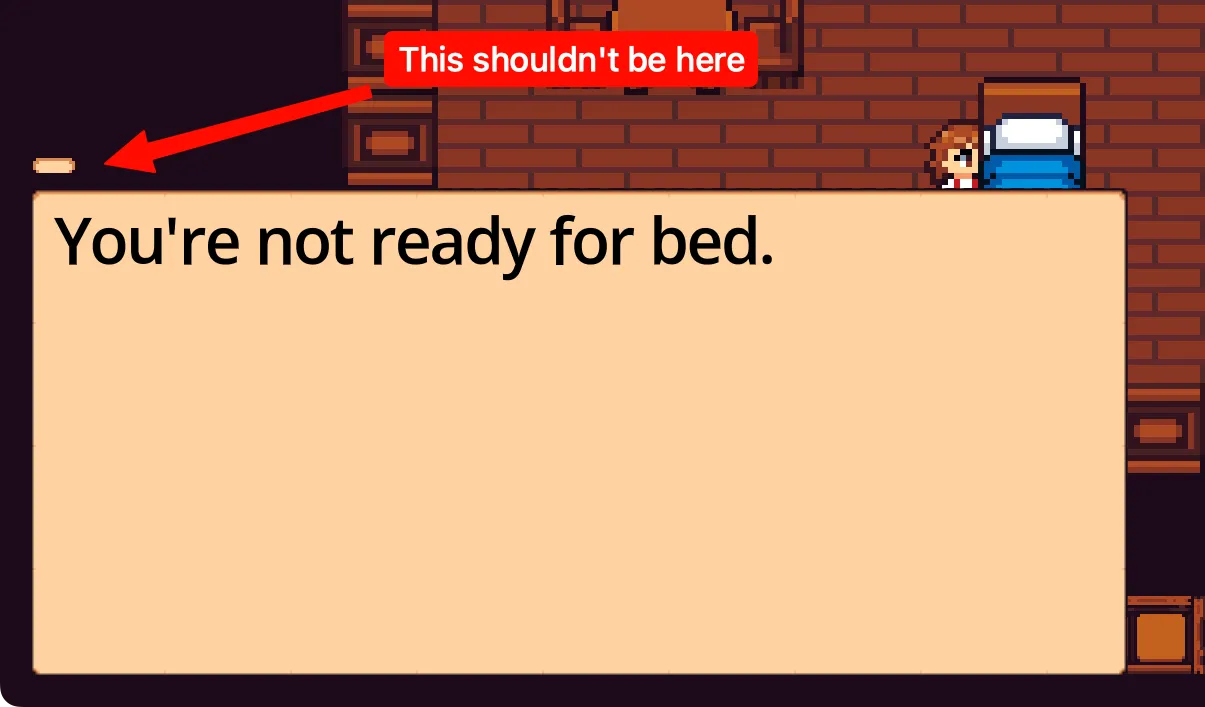 Fixing this is pretty easy:
- Make your own
LinePresenterwith this code:public partial class LinePresenterConditionallyHidingCharacterNameContainer : Node, DialoguePresenterBase{[Export] public CanvasItem characterNameContainer;public List<IActionMarkupHandler> ActionMarkupHandlers { get; }public async YarnTask RunLineAsync(LocalizedLine line, LineCancellationToken token){characterNameContainer.Visible = line.CharacterName is not null;}} - Set the
characterNameContainerin yourLinePresenterin Godot - Have your
DialogueRunnerpoint to the newLinePresenter
OptionsPresenter
Section titled “OptionsPresenter”The option navigation is coded using Godot’s focus order, which is automatic.
There are no events or way to detect that you’ve selected a particular option like there are for LinePresenter. If you want this behavior, here’s what Claude suggested:
- Option 1: Custom presenter (C#)
- Create a class implementing
DialoguePresenterBaseand overrideRunOptionsAsync. It gets called the moment options are ready:
public override async YarnTask<DialogueOption?> RunOptionsAsync(DialogueOption[] dialogueOptions, CancellationToken cancellationToken){// Options are now visible — do your detection hereEmitSignal(SignalName.OptionsPresented, dialogueOptions.Length);return null; // return null to let another presenter handle actual selection}- Add it to the
dialoguePresentersarray alongside your existingOptionsPresenter.
- Create a class implementing
- Option 2: Subclass
OptionsPresenter- Override
RunOptionsAsyncin a subclass, callbase.RunOptionsAsync(...)for the actual UI, and add your detection logic before or after.
- Override
Performance
Section titled “Performance”- Turn off
YarnSpinnerGodot.BasicTypewriter.ConvertHTMLToBBCodeIfConfigured(it’s onLinePresenteras an exported checkmark) and prefer BBCode instead. That function alone on a single script took ~12ms, and it runs for each line of dialogue with no caching. - There’s a pretty intense start-up cost for showing your first dialogue in the game. E.g. if you just make a new project with this code and any dummy dialogue:
public override void _PhysicsProcess(double delta){float speed = 150f;if (Input.IsActionPressed("ui_accept")){_sprite.Position += Vector2.Right * speed * (float)delta;}if (_sprite.Position.X > 200 && !_started){_started = true;_ = _runner.StartDialogue("Start");}}
- …you’ll see an obvious delay as the sprite is moving right.
- I think the best solution is to do something like this during a loading screen:
private async Task SetUpDialogueRunner(){_runner = GetNode<DialogueRunner>("%DialogueRunner");var yarnSpinnerCanvasLayer = GetNode<CanvasLayer>("%YarnSpinnerCanvasLayer");yarnSpinnerCanvasLayer.Hide();await _runner.StartDialogue("Start");await _runner.Stop();_runner.onDialogueStart += OnDialogueStart;_runner.onDialogueComplete += OnDialogueComplete;// Wait for the fade out to finishawait ToSignal(GetTree().CreateTimer(0.5f), SceneTreeTimer.SignalName.Timeout);yarnSpinnerCanvasLayer.Show();}
Localization
Section titled “Localization”General localization notes
Section titled “General localization notes”- Yarn Spinner exports multiple Yarn scripts (e.g.
town.yarnanddungeon.yarn) to the same CSV file. This is whyfileis a column within the CSV, that way you can tell where a line came from. - Yarn Spinner is smart enough to strip out
ifstatements from choices. E.g.-> Any ideas how to escape? <<if $has_chosen_escape == false>> #line:015bcdbwill show up in your translation file as “Any ideas how to escape?” - When you inspect a
.yarnprojectin Godot’s Inspector, you’ll see an “Update Localizations” button. Clicking this will generate CSV files and also.translationfiles, which are used by Godot (reference).- You must add the
.translationfiles via Project → Project Settings → Localization → Translations for your project to use them.- If you want to test out a particular language, follow these Godot instructions.
- You must add the
- You can make your own
#linetags, but I’m sticking to the randomly generated ones so that I don’t need to craft special names for all of them. On Weblate, the English string will show next to the text input for translation anyway if you set up a base language for your monolingual component.
.csv → .po
Section titled “.csv → .po”Yarn Spinner only generates .csv files, so for Stuck in a Broken Tutorial, we convert them to .pot and .po files with a custom tool (I had AI write it) so that Weblate will work with them (monolingual gettext is only for .po files (reference)). The English is pulled directly from the .yarn file into en_US.po, that way you can still edit .yarn files directly without having a bunch of meaningless identifiers or needing a tool to translate to and from the identifiers.
Yarn Spinner generates .translation files when you update .csvs. We don’t need those files because we convert to .po for the sake of Weblate, and Godot can use .po files directly, so we just .gitignore them.
Plurals and gender
Section titled “Plurals and gender”- Plurals: there’s a built-in plural mark-up, e.g.
PieMaker: I just baked [plural value={$pie_count} one="a pie" other="% pies" /]!. However, this will require your translators to respect this mark-up for translated text. IMO, unless you have tons of plurals in your game, you probably shouldn’t try to write any sort of convenience layer to convert to/from, say,.pofiles’msgid_pluralformat (reference). - Gender: you have a couple of options:
- Use select markup, e.g.
I think [select value={$gender} m="he" f="she" nb="they" /] will be there!- Like plurals, this would require your translators to respect the mark-up.
- Wrap in
ifstatements:<<if $is_masculine == 1>>He did it!<<else>>She did it!<<endif>>- Your translators could just type plain language with no mark-up.
- Use select markup, e.g.
Troubleshooting
Section titled “Troubleshooting”Changes you make aren’t actually doing anything
Section titled “Changes you make aren’t actually doing anything”This almost always means you have a compilation error in a .yarn script. To figure out what the error is, simply open the .yarnproject file in Godot and click “Re-compile Scripts in Project”. You should see a Godot error print out like this:
ERROR: res://addons/YarnSpinner-Godot/Editor/YarnProjectEditorUtility.cs:568 - Error compiling: 285:15: Error: Jump to undefined node: 'GoToCommunityCenter'Alternatively, if there are no errors, then perhaps you just didn’t update your localized dialogue, so the same line IDs are correlating to old strings.
”Unable to load addon script”
Section titled “”Unable to load addon script””If you try launching your game and see this:
Unable to load addon script from path: 'res://addons/YarnSpinner-Godot/YarnSpinnerPlugin.cs'. This might be due to a code error in that script.Disabling the addon at 'res://addons/YarnSpinner-Godot/plugin.cfg' to prevent further errors.…simply build your project first, then go enable Yarn Spinner via Project → Project Settings… → Plugins.