Audio in Godot
Looping music
Section titled “Looping music”.wav files allow for looping, but I couldn’t easily get it to work when exporting a .wav from FL Studio even though Godot is supposed to be able to detect looping from the .wav itself. If it doesn’t do that, then you can set edit/loop_begin in the “Import” section of Godot when selecting the file in the filesystem. It’s only an integer (since it’s in samples), so I’m not sure how you’re supposed to ensure your looping actually works.
.ogg and .mp3 files, on the other hand, have an advanced editor for setting up looping:
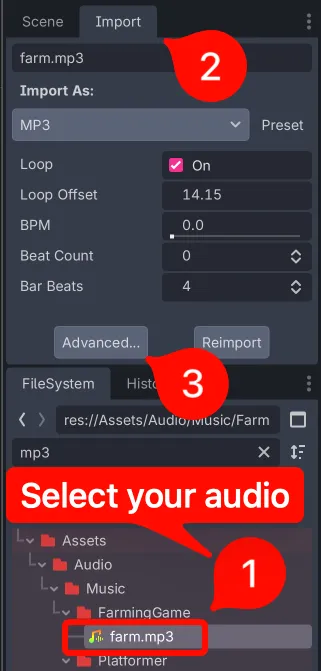
Once in “Advanced…”, you can set the loop offset. The nice thing is that you can test looping right here in this editor by seeking to the end and pressing the ▶️ button.
Playing sounds
Section titled “Playing sounds”Basics
Section titled “Basics”- First, the Godot docs suggest that you just let each individual scene manage its own sounds as opposed to having a singleton SoundManager or something (reference)
- There is now a
max_polyphonyproperty (reference) which automatically handles what happens when you try playing too many sounds at once through an audio player. - Godot has functions to convert from linear to logarithmic values for decibels:
linear2dbanddb2linear(these are inMathfin C# and the2is spelled out, e.g.Mathf.LinearToDb). - Just like how Godot has groups, sounds and music can be classified into buses. It’s AudioStreamPlayer that has this property. Once you have a bus, you can individually control volume levels, toggle mute, add effects like reverb, etc. Clicking “Audio” at the bottom of Godot will let you modify them:
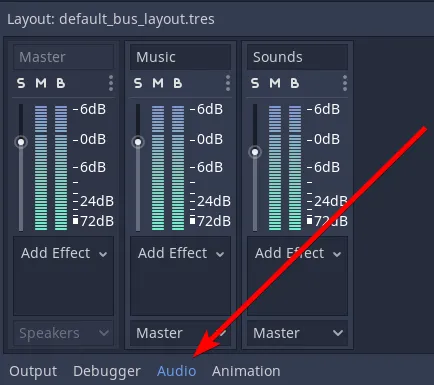
- With either code snippet above, you may want to set the “bus” on the audio_stream_player. You can add buses by clicking an AudioStreamPlayer in the scene tree from within the editor, then clicking “Audio” at the bottom of Godot. Buses are identified by strings.
Code to control sounds
Section titled “Code to control sounds”This code will add a sound scene and free it when it’s finished playing, so it requires that your AudioStreamPlayer exists in its own scene:
static func add_sound_to_node(scene_path:String, node:Node) -> void:var packed_scene:PackedScene = load(scene_path)var audio_stream_player:AudioStreamPlayer = packed_scene.instance()audio_stream_player.autoplay = true
var _ignored = audio_stream_player.finished.connect(audio_stream_player.queue_free)node.add_child(audio_stream_player)
This code will read directly from a .wav file so that you don’t need a scene (don’t use this without reading the code after this snippet):
static func add_sound_to_node_by_sound_file(sound_path:String, node:Node) -> void:var audio_stream_player:AudioStreamPlayer = AudioStreamPlayer.new()var audio_stream:AudioStreamSample = AudioStreamSample.new()var file:File = File.new()var _ignored = file.open(sound_path, File.READ)
var buffer:PoolByteArray = file.get_buffer(file.get_len())file.close()audio_stream.data = bufferaudio_stream.format = AudioStreamSample.FORMAT_16_BITSaudio_stream_player.autoplay = trueaudio_stream_player.stream = audio_stream
_ignored = audio_stream_player.finished.connect(audio_stream_player.queue_free)node.add_child(audio_stream_player)
That code works from Godot, but it doesn’t work from an HTML5 export thanks to File.new() (reference). Instead, change “File.new()” to use “load”
static func add_sound_to_node_by_sound_file(sound_path:String, node:Node) -> void:var audio_stream_player:AudioStreamPlayer = AudioStreamPlayer.new()    var audio_stream_sample:AudioStreamSample = load(sound_path)
audio_stream_player.autoplay = trueaudio_stream_player.stream = audio_stream_sampleaudio_stream_player.bus = "Sounds"
var _ignored = audio_stream_player.finished.connect(audio_stream_player.queue_free)node.add_child(audio_stream_player)