Steam integration
Overview
Section titled “Overview”The scenario that I needed Steam integration for is:
- A C# project
- Steam features I need
- Achievements
I’m writing this note from that perspective.
Helpful overall notes:
- It doesn’t actually matter if you launch the game through Steam or not. E.g. a player could have purchased and installed through itch.io, but as long as Steam is running on their machine, you could still grant an achievement and they’ll see it pop up in Steam.
- Download SteamGodot through the asset library directly in Steam. Make sure you don’t get the “server” version (unless you actually need that version for multiplayer; see the differences on their site).
- Note: you would commit this addon to your source repo since it’s needed to build your game and Godot doesn’t have a package manager (at least as of 2025).
- Download the C# bindings.
git clone https://github.com/LauraWebdev/GodotSteam_CSharpBindings.git- Copy
/addons/godotsteam_csharpbindingsinto your game’saddonsfolder. I had to do this by dragging from the macOS Finder into Godot; usingcpto copy the folder didn’t seem to get Godot to pick it up.
- I copied in their example script to a
Nodein my project. Any errors should be printed out. In the success case, it should either say your Steam name or that Steam isn’t running. - Note: you don’t need to do anything special on export like add DLLs; this is handled automatically.
Methods I didn’t try
Section titled “Methods I didn’t try”- This library
- Making my own API client from scratch
Achievements through GodotSteam
Section titled “Achievements through GodotSteam”storeStatscan be rate-limited and shouldn’t be called often (reference)
Achievements on Steam
Section titled “Achievements on Steam”Just look at Steam’s documentation for this; it’s all very straightforward. Some notes:
- Valve doesn’t recommend using achievements for demos (reference).
- At least as of 2025, it does not seem possible to bulk-add achievements to your game. This makes it tedious to keep achievements in-sync between the playtest and full versions of your game.
- You can localize your achievements directly on Steamworks (reference).
- Achievements can be automatically granted by a stat (see “Progress Stat” on this page). The max value in the achievement is actually the minimum value needed to get the achievement. E.g. “click 25 apples” - I would set the minimum to 0 and the maximum to 25, and then clicking 30 apples all at once would still grant the achievement.
- Do not set “Increment Only” unless you’re only ever incrementing by 1.
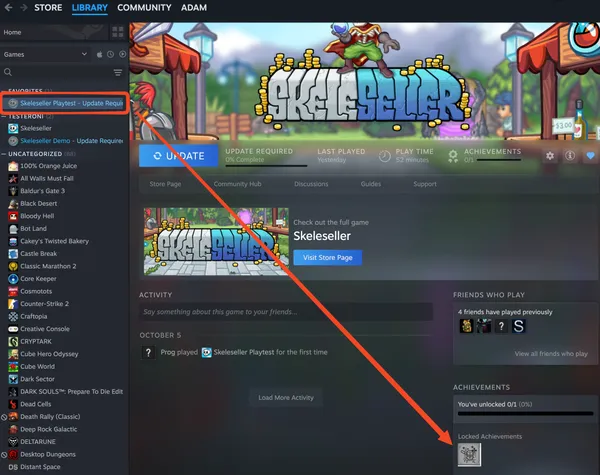
- Make sure you’ve published new achievements. You may need to restart Steam after publishing:
-
- To reset your achievements on macOS:
- Close Steam
- Run
/Applications/Steam.app/Contents/MacOS/steam_osx -console - You’ll see “Console” show up in Steam itself:
-
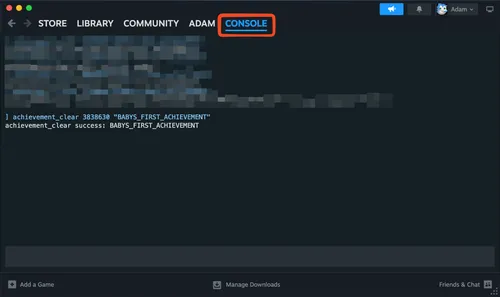
- You can either do
achievement_clear app_id "ACHIEVEMENT_ID"orreset_all_stats app_id- If this fails, try updating the game first.
- You may need to run the game again afterward for Steam to “unachieve” anything you’ve already unlocked
-