Internationalization in Godot
Overview
Section titled “Overview”This note covers what we did for Skeleseller (which used C#) to internationalize/localize the game. Godot has documentation on the general process here.
For translation, the high-level plan was to use machine translations as a foundation and community contributions to improve the machine translations. Note: the languages to target, at least in 2025, seem to be:
- French
- Italian
- German
- Spanish
- Simplified Chinese
- Japanese
- Korean
- Brazilian Portuguese
At a high level, you need to perform these steps:
- Finding strings in your codebase that should be translated
- Translate those strings (see Machine-translation services)
- Use the translated strings accordingly
- This is simply a matter of calling into Godot’s translation functions (
Tr,TrN,TranslationServer.Translate,TranslationServer.TranslatePlural)
- This is simply a matter of calling into Godot’s translation functions (
Using keys/identifiers vs. text as your message IDs
Section titled “Using keys/identifiers vs. text as your message IDs”For Skeleseller, we ended up manifesting msgid in .pot files directly as English strings, e.g.:
Here’s the C# source code:
public static readonly AbilityData Data = new( AbilityId.Fireball, GetDisplayName: () => Translate("Fireball", "AbilityNames") );Here’s the .pot file that gets generated from that:
#: Src/Abilities/Active/Fireball.cs:4msgctxt "AbilityNames"msgid "Fireball"msgstr ""What’s nice about this is that you can see directly in the source code how your string will look to an English user. What’s not nice about this is how Weblate handles changes to the msgid. In short, it deletes all of your history and context (see Weblate#Updating a source string can cause Weblate to lose history, comments, screenshots, explanations, and permalinks).
It’s probably smarter to use keys or identifiers from the beginning of your project. Instead of Translate("Fireball"), you would have something like Translate(StringIds.FIREBALL_DISPLAY_NAME). You don’t even necessarily have to use xgettext at that point since your strings would all be defined in their own standalone .po files (or some other format). I haven’t pursued this yet for a game, so I haven’t listed out the full instructions here.
Finding strings in your .tscn files that should be translated
Section titled “Finding strings in your .tscn files that should be translated”Godot supports the extraction of strings directly from the editor (reference). There are some caveats:
- At the time of writing, there is no way to do this from the command line (reference).
- File paths that show in Localization → POT Generation have no validation. E.g. you could have a made-up path there and Godot would never tell you. This means that you need to maintain the list of scenes to be translated.
If you want to exclude a particular string from being translated, you would simply change the node’s AutoTranslateMode. It’s set to AUTO_TRANSLATE_MODE_INHERIT by default, so you can exclude entire subsections of a scene tree by changing a common parent to AUTO_TRANSLATE_MODE_DISABLED. This is useful when you know you’re going to set text dynamically through code so that you don’t need to use a sentinel value like “(this is set via code)” in the editor and can instead use representative placeholder data.
Note: a frequent pattern in Skeleseller is that a label is dyanmic and should be set to AUTO_TRANSLATE_MODE_DISABLED, but its tooltip is constant. As a result, the tooltip needs to be set to AUTO_TRANSLATE_MODE_ALWAYS or else it will inherit the disabled state of the parent. As an example, picture a label that shows health, which would clearly be dynamic, but the tooltip says “How much health you have. Increase by drinking potions.”, which never needs to change.
Finding strings in your codebase that should be translated
Section titled “Finding strings in your codebase that should be translated”We used xgettext for this. For C#, xgettext can only find function calls with string literals:
- ✅
Translate("hi") - ❌
Translate(someString)- This won’t be found even if
someStringdefinitely points to a string.
- This won’t be found even if
As such, it’s best to wrap every translated string in some set of known function calls (like Translate or TranslatePlural). However, you can pass --extract-all to xgettext to have it extract every string from your files. This would include strings like Color.FromHtml("c70000") which don’t need to be localized. If you want to prevent finding those, you could make xgettext only search certain files/directories and consolidate all of your strings there.
Here’s the documentation for xgettext. It’s quite helpful and has some examples.
We run xgettext with the following arguments:
"--keyword=TranslationServer.Translate:1""--keyword=TranslationServer.Translate:1,2c""--keyword=Translate:1""--keyword=Translate:1,2c""--keyword=TranslatePlural:1,2""--keyword=TranslatePlural:1,2,4c""--keyword=Tr:1""--keyword=Tr:1,2c""--keyword=TrN:1,2""--keyword=TrN:1,2,4c""--from-code=UTF-8""--language=C#""--add-comments=I18N""--sort-by-file""--force-po""--files-from=/path/to/a_file_with_all_filepaths_in_it_on_separate_lines.txt""--output=/path/to/a_pot_file.pot"
Explanations:
- The
--keywordarguments are for finding calls in the source C# code. The “c” that’s appended to some of the numbers indicates thecontextargument. For example,Translate:1,2cwill matchTranslate("Hello", "Greetings")in C# and emit it to the.potfile.- The context can be helpful if you have many strings that are the same in English but may not be the same in other languages. For example, you may have an ability called
Boulderand an item calledBoulder. The context could be set to"Abilities"or"Items"appropriately.
- The context can be helpful if you have many strings that are the same in English but may not be the same in other languages. For example, you may have an ability called
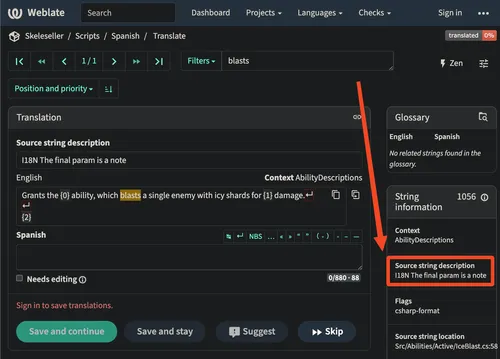
--add-comments=I18Nmeans that comments in C# that start withI18Nwhich immediately precede a translation call will make it to the.potfile. This can be helpful if there’s any context you want to add, e.g.// I18N This should be a short string.- If using Weblate, this will show to translators:
-
- If using Weblate, this will show to translators:
- We do not use
--join-existingso that the.potfile will be generated anew every time we runxgettext. This is so that comments don’t accumulate in the file, e.g. due to changing the line number of a translated string in C# and then callingxgettextagain.- The
.pofiles themselves are specific to each language and will maintain any comments starting with#in them even acrossxgettextgenerations. By using these comments, we can mark metadata about a string like whether it was translated by a machine or a human.
- The
Machine-translation services
Section titled “Machine-translation services”Azure and Google Cloud Platform have very permissive translation services:
Azure’s allows 2 million characters per month for free. They even allow you to train a custom model, but that won’t work for indie game devs since it requires ten thousand training sentences (reference).
I.e. using these services are basically like going to Google Translate, typing in text, and getting the output in another language. It’s not going to let you provide context or do any meaningful training (unless you already have ~10k sentences, which is doubtful).
You may want to consider LLM-based translations as well.
Community contributions
Section titled “Community contributions”I ended up using Weblate. It’s a self-hostable tool that lets you get translations from the community. My notes on Weblate are here: Weblate.
I highly recommend using this over making something yourself; it just handles so many things automatically (Git integration, comments on translations, revision history, plural forms, etc.).
Formatting strings for localization
Section titled “Formatting strings for localization”There are a few cases to accommodate (see sub-headers below).
Strings with articles, gender, or other human-language-specific constructs
Section titled “Strings with articles, gender, or other human-language-specific constructs”Imagine a common scenario for lots of games: unlocking levels/zones. In English, maybe you have strings like this:
- “You have unlocked the Forest!”
- “You have unlocked the Canyon!”
- “You have unlocked the Volcano!”
It’s tempting to manifest a single string, "You have unlocked the {0}!", and then format it with the location name. However, this won’t work for languages with gendered articles (e.g. in French, it’s la forêt but le canyon). Instead, it’s generally recommended that you manifest the strings individually.
- Pros
- This allows the translator full control over the translated string, e.g. maybe “Forest” changes forms based on if it’s a subject or an object and thus wouldn’t match all other uses of the word “Forest”.
- Without placeholders, there’s no question of what words the string could contain—they’re all right there in the string!
- Cons
- As a developer, it would be much harder for you to rename something. E.g. if you had a variable like
bool isEnabled, your IDE could find just that specific symbol’s uses and not every place in the code that the words “isEnabled” show up. However, when inside of a string, there’s no easy way to find every instance of “Forest” that refers to the zone name and not just some random NPC’s text (“I found my dog in a forest”).- You can potentially make this easier by colocating strings like that or making some kind of custom annotation/validation system, but it may not be worth the effort. To illustrate what I mean, imagine:
[ContainsLocationName(LocationId.Forest)]public static string UnlockedForest = Translate("You have unlocked the Forest!");// ...then, you would have an automated test that ensures all strings tagged with "ContainsLocationName"// actually contain that name in English.
- You can potentially make this easier by colocating strings like that or making some kind of custom annotation/validation system, but it may not be worth the effort. To illustrate what I mean, imagine:
- As a developer, it would be much harder for you to rename something. E.g. if you had a variable like
Alternatives:
- You could reword the string such that articles/genders/whatever aren’t needed, e.g. a header of “You’ve unlocked a new location!” and a sub-header of “Forest”.
- You can use ICU MessageFormat.
- You can add the article or gender to the parameter, e.g.
You have unlocked {0}, where{0}gets replaced by something likeFormatLocationNameWithArticle. This presumably causes other problems (e.g. at the very least, translators will probably have a harder time piecing together a string’s context) and requires you to be aware of any part of a string that could change.
Other examples of problematic strings:
- “Your” in many languages is gendered, so a string like “Increase the duration of 0” can’t necessarily be translated unless you know the gender of
{0}. French can get around this by using the formal version of “your” (“votre”), which doesn’t change based on the gender of the subject, but German has no form of “your” which can remain static regardless of the subject.
Pluralized strings
Section titled “Pluralized strings”Godot has built-in functions for these: TrN and TranslationServer.TranslatePlural:
TranslatePlural( "You have {0} unspent skill point.", "You have {0} unspent skill points.", points),This will generate something like this in the .pot file:
#: Src/YourFile.cs:122#, csharp-formatmsgid "You have {0} unspent skill point."msgid_plural "You have {0} unspent skill points."msgstr[0] ""msgstr[1] ""Godot will automatically handle languages with multiple plural forms for you. This is one of the many nice features of .po files, which is that they contain a Plural-Forms section at the top that tells you how the language treats plurals. For example, here’s what a Polish .po file may look like (this is from a site I found through hosted.weblate.org):
"Plural-Forms: nplurals=3; plural=""(n==1 ? 0 : n%10>=2 && n%10<=4 && (n%100<10 || n%100>=20) ? 1 : 2);\n"
# (↑ many lines removed for brevity ↓)
#: pretalx/agenda/templates/agenda/speaker.html:69msgid "Session"msgid_plural "Sessions"msgstr[0] "Wystąpienie"msgstr[1] "Wystąpienia"msgstr[2] "Wystąpień"
As you can see from the Plural-Forms rule, the indices 0, 1, and 2 are returned based on n, which is the number specified to Godot’s TrN. So even though TrN only takes two strings, Godot will use the relevant plural from the file based on the language’s plural rules.
Strings with parameters
Section titled “Strings with parameters”Wrap your Translate call in string.Format (since you need Translate to take in a string literal for xgettext to find it):
string.Format( Translate( "Erratically shoots at a single enemy for {0} damage, but has a {1} chance to miss.", "Abilities" ), FormatNumber($"{damage:0}"), FormatNumber($"{MissChance:P0}"));To catch mistakes with missing parameters at build/coding time, we use a C# analyzer (see C sharp#Writing analyzers for a public note and foundational code, but the private Skeleseller repo has the full code).
Strings with BBCode
Section titled “Strings with BBCode”BBCode adds formatting like [color=red] to text, which means you should decide whether you want that formatting to show up for translators or not. In some cases, you may.
If you include the formatting:
- Pros
- It’s easier to code (see examples below; it’s just one line).
- The translator will only see a single string. In the example below where formatting is excluded, you end up with a string that just says “(crit!)” with no context as to where this appears. You also get the string
"{0} damage {1}", but it’s not obvious what the{1}is supposed to represent. - Sometimes you want to localize the formatting. E.g. in some cultures, poison is represented as green, and in others, it may be purple.
- Cons
- Machine translations may try translating them (e.g.
[couleur=rouge]) - They inflate the translation file.
- You can’t reuse the formatted string easily. E.g. in the code below, we have the word “crit!” formatted red. If we had “crit!” show up in many messages, translators would have to provide it for each location.
- You could work around this by reusing just the “crit!” string or the whole
[color=red](crit!)[/color]. In other words, whether you choose to include or exclude a string doesn’t mean you have to do that for every string in your codebase.
- You could work around this by reusing just the “crit!” string or the whole
- Machine translations may try translating them (e.g.
Including formatting
Section titled “Including formatting”string damageString = string.Format(Tr("{0} damage [color=red](crit!)[/color]"), damage)This will appear in your translation file like so:
#: Src/YourFile.cs:120#, csharp-formatmsgid "{0} damage [color=red](crit!)[/color]"msgstr "{0} damage_in_another_language [color=red](crit_in_another_language!)[/color]"Excluding formatting from translation files
Section titled “Excluding formatting from translation files”In the example below, the English string emitted is "5 damage (crit!)" (“crit!” is in red):
string critMessage = $"[color=red]{Tr("(crit!)")}[/color]";string damageString = string.Format(Tr("{0} damage {1}"), 5, critMessage);As shown above, the [color=red] and its corresponding closing tag, [/color], will not appear in the .pot file:
#: Src/YourFile.cs:119msgid "(crit!)"msgstr "(crit_in_another_language!)"
#: Src/YourFile.cs:120#, csharp-formatmsgid "{0} damage {1}"msgstr "{0} damage_in_another_language {1}"
Strings with C#-specific formatting
Section titled “Strings with C#-specific formatting”If you want the translators to be able to customize the formatting of a parameter, just put it into the translated string:
string.Format(Translate("The number is: {0:P0}"), 0.45f); // "The number is: 45%"TimeSpan timeSpan = TimeSpan.FromSeconds(125);string.Format(Translate("{0:%m}m{0:%s}s"), timeSpan); // "2m5s"E.g. the time string will show in the .po file like this:
msgid "{0:%m}m{0:%s}s"…meaning translators can use Custom TimeSpan format strings.
Changing fonts at runtime
Section titled “Changing fonts at runtime”Depending on how your scene hierarchy is set up, you won’t just be able to change a theme on your root node and have the fonts propagate to each node in your scene. For example, CanvasLayer does not have a Theme property and is frequently a parent of Control nodes, meaning a scene hierarchy like RootWithTheme → CanvasLayer → Label won’t apply the theme to the Label. However, gui/theme/custom (the project-wide theme) will apply to that Label.
What we did for Skeleseller is to change gui/theme/custom_font, gui/theme/custom, and then the fonts of individual themes as needed.
Changing the project-wide theme can be done with this code:
Theme theme = ThemeDB.GetProjectTheme();theme.DefaultFont = ResourceLoader.Load<Font>("res://Assets/Fonts/SomeFont.ttf");Do not try to use this; it doesn’t work:
// (don't do this; it's just not how you update a font)theme.SetFont( "default_font", string.Empty, someFont);Fallback fonts
Section titled “Fallback fonts”Some users may have fonts installed on their machines for particular languages. For example, I have a Korean font for some reason despite not understanding Korean, but I didn’t have a Chinese or Japanese font. As a result, Korean text would show up in Skeleseller, but it would use whatever font the system found.
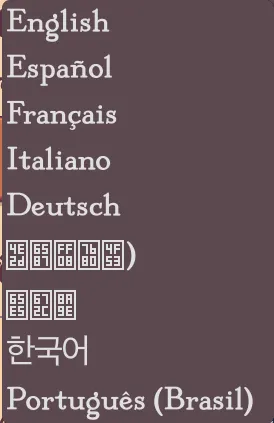
If you want your font to look “flavorful” and consistent for the game, you will almost certainly want to bundle a font into the game. Also, if you don’t have a fallback font on the system and try rendering certain Unicode characters, they’ll show up as boxes with numbers in them. This looks pretty unprofessional even if it’s just for a language-selection menu:
Other helpful tips
Section titled “Other helpful tips”- Godot has built-in pseudolocalization (reference)
- It can be a really good idea to get a single language translated first before unleashing your source text on all of your translators. That first translator can help you work through any systemic issues. I had a lot of things pop up that eventually filled out the rest of the notes here, but for some quick examples:
- Text with unnecessary formatting:
[center]Some title[/center] - Text with difficult-to-translate gendered articles:
You hired the {0}(where{0}was an adventurer class like “Rogue”) - Text that shouldn’t have been translated at all:
UnlockedPerksTabTitle
- Text with unnecessary formatting:
- Obsolete and fuzzy strings
#~represents an obsolete string (one that doesn’t correspond to an ID in the.potfile) (reference).- A
#, fuzzycomment means that an update was made to the source such that the translation probably needs to be looked at. For example, if you change “Fireball” to “Fireball 2” in your source code, you’ll get the “fuzzy” tag in the resulting.potand.pofiles. This means two things:- A translator should look at it since it may no longer be correct.
- ⚠️ Godot will not render the translated string (reference). So if you see English everywhere even though you have a fully translated
.pofile, perhaps all of your strings are marked “fuzzy”.
- Make sure to examine your
.POTfile after adding a scene and making sure that all references to that scene in the.POTfile make sense.- For example, I had a
TabContainerand didn’t expect theControlnodes underneath to have their node names translated. It made me realize that you can even have spaces in the node names for when the tab titles should have spaces!
- For example, I had a