itch.io
Itch page
Section titled “Itch page”- To make GIFs, I highly recommend Gifski. It’s so easy, and you can preview export sizes to make sure you’ll fit Itch’s requirements (at the time of writing, it just seems to be any GIF smaller than 5 MB).
Uploading builds (reference)
Section titled “Uploading builds (reference)”- Install butler (the “human way” just has links directly on itch.io)
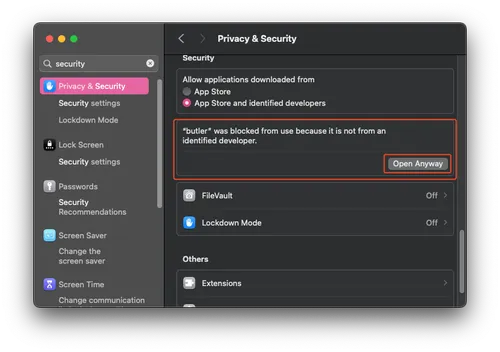
- The builds won’t launch automatically on macOS. You need to open the Privacy & Security preferences on macOS and click “Open Anyway”:
-
- Run
butler loginto log in butler push <directory_or_path_to_zip_file> xtonomous/skeleseller:channelchannelshould start with the OS (win|windows|linux|mac|osx|android).- E.g.
./butler push /Volumes/inland/code/Godot/Skeleseller/Game/out/macos_release.zip xtonomous/skeleseller:mac./butler push /Volumes/inland/code/Godot/Skeleseller/Game/out/windows.zip xtonomous/skeleseller:win./butler push /Volumes/inland/code/Godot/Skeleseller/Game/out/linux.zip xtonomous/skeleseller:linux
Uploading paid content
Section titled “Uploading paid content”UPDATE: you can now use --hidden (reference).
As far as I can tell, new channels are publicly visible as soon as you upload anything to them. Here are the steps I went through to go from having only a demo to having both a demo and paid version:
- First, upload an empty
.zipfile so that you don’t leak anything:butler push ./empty.zip xtonomous/skeleseller:full-mac
- Next, go to Itch, edit your game, and check ”✅ Hide this file and prevent it from being downloaded”.
- You can also change the display name here, e.g. “Demo (macOS)” vs. “Full version (macOS)“. Future uploads to the same channel will respect this display name.
- Save your page.
- Upload the real contents now that no one can see that download.
- Mark your application ”✅ Paid” and set up prices.
- Mark the demo versions ”✅ This file is a demo and can be downloaded for free”
- Also, once you do this, you may want to change your project status from “In development” to “Released”.
Alternatively, you can just change the entire page’s visibility to “Draft” or “Restricted” while making any of these changes.
Uploading GIFs
Section titled “Uploading GIFs”As of Wed 01/21/2026, this is broken, and the GIFs actually need to be animated PNGs. The ffmpeg commands to turn a video into a reasonably-sized, looping, animated PNG:
ffmpeg -i input.mp4 -vf "fps=24,palettegen=stats_mode=diff" palette.pngffmpeg -i input.mp4 -i palette.png -lavfi "fps=24,paletteuse=dither=bayer:bayer_scale=3" -plays 0 -f apng output.png- Use
-yto overwrite the output if it already exists
- Use