C sharp
Basics
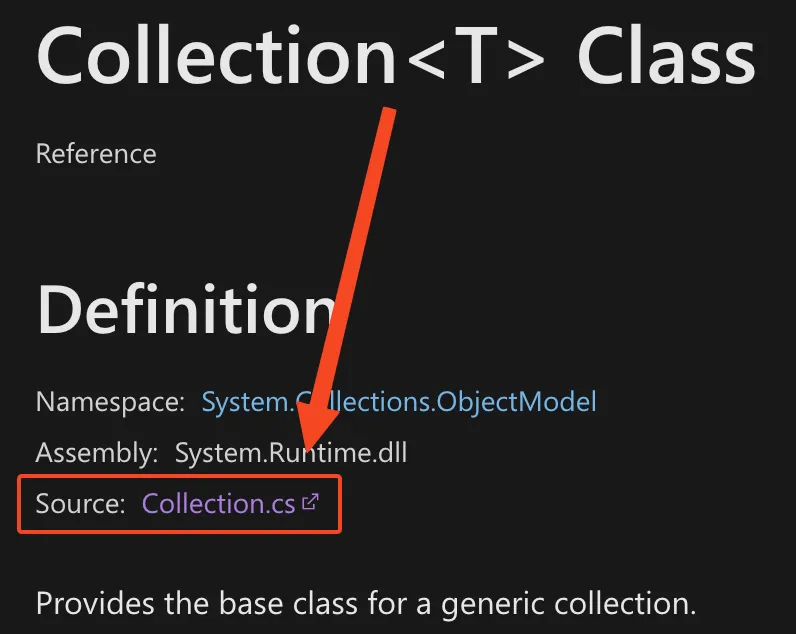
Section titled “Basics”- C# is open-source. If you ever want to find the code behind a particular class, go to a page like this and click the “Source” link toward the top:
dotnetis the CLI. You get it as part of installing the SDK, which you can get here. That’s also the route you’ll go through for updates.null!: the “null-forgiving” operator (reference). Use it when you know that an expression can’t benullbut the compiler can’t tell. For example, in Godot, you can set some variables through the game engine itself, but C# won’t know that they’re set, so you would initialize the variable usingnull!:[Export]private Sprite2D _bullet = null!;- Note that structs and classes have different ways of becoming nullable. Instances of a class can always be
null, but instances of a struct need to be wrapped inNullable<T>, which is what happens when you make aFooStruct? myStruct. When wrapping in aNullable, you should useHasValueandValueand not just!= nullandmyStruct!.
- Note that structs and classes have different ways of becoming nullable. Instances of a class can always be
- The equivalent of Java’s
IllegalStateExceptionisSystem.InvalidOperationException(reference). - Reflection is generally slow. Whenever you would use reflection, you could consider using source generators instead. They’ll operate at compile time, but they could generate methods for you that may replace what you were doing with reflection.
- Use a
Stopwatchto keep track of how much time has elapsed:Stopwatch _stopWatch = new();_stopWatch.Start();// do something_stopWatch.Stop();TimeSpan ts = _stopWatch.Elapsed;string elapsedTime = string.Format("{0:00}:{1:00}.{2:00}", ts.Minutes, ts.Seconds, ts.Milliseconds / 10);
Making a new project from the command line
Section titled “Making a new project from the command line”You actually just do this from the command line using the dotnet tool (reference):
dotnet new sln -o MyProjectdotnet new console -o MyProject.Maindotnet sln MyProject.sln add MyProject.Main/MyProject.Main.csprojdotnet builddotnet run- It’ll show “Hello, World!”
However, as of May, 2025, you can directly run a standalone C# script with dotnet run (reference).
See C sharp and JSON.
Using Linq in a debugger
Section titled “Using Linq in a debugger”At least in VSCode, if you try to evaluate an expression like foo.ToList() in a file that didn’t explicitly write using System.Linq;, you’ll get an error like this:
foo.Values.ToList()
error CS1061: 'Dictionary<int, int>.ValueCollection' does not contain a definition for 'ToList' and no accessible extension method 'ToList' accepting a first argument of type 'Dictionary<int, int>.ValueCollection' could be found (are you missing a using directive or an assembly reference?)
You can still use it via System.Linq.Enumerable.ToList, which is a bit unwieldy: System.Linq.Enumerable.ToList(foo.Values)
Generics
Section titled “Generics”If you have a generic class and you want to get the name of that class with a specific type in it, you can’t just do nameof(GenericClass) or else you get something like GenericClass`1. Instead, you have to do this: typeof(GenericClass<SomeTypeHere>).Name.
Tuples
Section titled “Tuples”If you need an arbitrary bunch of parameters (e.g. a Pair of something), try Tuple:
- Anonymous:
Tuple<X, Y> - Named:
(X x, Y y)
The named variant is really nice for saying what something represents, that way you don’t just have Tuple<int, int> and wonder which int is what:
public (int cost, int distance) GetTripDetails() {  return new(5, 27);}
public void ShowHowToCall() {  (int cost, int distance) = GetTripDetails();  // ...}
This applies even to iterating over dictionaries:
// Both of these are equivalent
// KeyValuePairforeach (KeyValuePair<VolumeSliderId, float> kvp in localSaveData.VolumeSliderValues){  LocalSettings.SetVolumeValue(kvp.Key, kvp.Value, false);}
// Tuple - notice the names for the key and value, which makes it clearer IMOforeach ((VolumeSliderId volumeSliderId, float value) in localSaveData.VolumeSliderValues){  LocalSettings.SetVolumeValue(volumeSliderId, value, false);}
Events
Section titled “Events”Simple example:
public class TargetLocationComponent(){    public event EventHandler<EventArgs> ReachedTarget = null!;
  // Events can only be emitted from the owning class    public void EmitReachedTarget()    {        ReachedTarget(this, EventArgs.Empty);    }}
// From some other code, raise the event:tlc.EmitReachedTarget();
// From some listener code, subscribe to the event:TargetLocationComponent tlc = new();tlc.ReachedTarget += (object sender, EventArgs args) => /* do something */;
Using reflection to call a generic function at runtime (reference)
Section titled “Using reflection to call a generic function at runtime (reference)”Here’s an example:
// Method signature:public static T AddComponent<T>(Node entity, T component)    where T : Component    {/*...*/}
// Calling that method:MethodInfo? addComponentGenericMethod =    typeof(Ecs).GetMethod("AddComponent")    ?? throw new InvalidOperationException("AddComponent method not found");MethodInfo addComponentSpecificMethod = addComponentGenericMethod.MakeGenericMethod(c.GetType());addComponentSpecificMethod.Invoke(null, [entity, c]);
Note that this may not work on all platforms (for example, maybe iOS) since it requires JIT compilation.
Writing analyzers
Section titled “Writing analyzers”- Note: it’s probably easiest to start this flow from Visual Studio itself, not from VSCode, since Visual Studio should handle a lot of the boilerplate.
- To use an analyzer you wrote without just installing it as a package:
- Include a
ProjectReferenceas mentioned here.- Note: by doing this as opposed to installing it via a NuGet package, you can’t force the build to fail on errors (reference).
dotnet sln MyProject.sln add Path/To/Analyzer.csproj- Not sure if this is necessary.
- Rebuild your project.
Console.WriteLinecalls from the analyzer will show in the “C#” output in VSCode.
- Include a
- Debugging from VSCode currently seems to be impossible (or maybe just incredibly difficult). Either way, I gave up on it. I think this issue needs to get fixed.
Troubleshooting
Section titled “Troubleshooting”Using Linq with enums
Section titled “Using Linq with enums”Consider this code:
public enum Fruit{    Apple,    Banana,}
public static void Main(){    Fruit? fruit = (new List<Fruit>()).FirstOrDefault();
    Console.WriteLine(fruit); // this will always print Apple (i.e. "fruit.HasValue" will always be true)}
The issue is that the default for an enumeration is the 0 value of that enumeration, which in this case is Apple (but if that weren’t defined, it would literally be the value 0). Your options are:
- Manifest
None = 0in theFruitenum - Change
Appleto beApple = 1and explicitly check forfruit == 0 - Write your own version of
FindorFirstOrDefault(probably as an extension). - Change
new List<Fruit>()→new List<Fruit?>()- (this probably isn’t a great option because you’d realistically have to change practically every type in the call stack to get to whichever function you’re writing)
Anonymous lambdas capturing the wrong value
Section titled “Anonymous lambdas capturing the wrong value”(kw: closure)
Example program:
public class Program{  public static void Main()  {    List<Action> functions = [];    for (int i = 0; i < 10; i++) {
      functions.Add(() => Print(i));    }    for (int i = 0; i < 10; i++) {      functions[i]();    }  }
  public static void Print(int i) {    Console.WriteLine(i);  }}
The output of this program is 10 10 10 10 ... and not 0 1 2 3 4 5 .... To fix this, simply copy i into a local variable and use that:
for (int i = 0; i < 10; i++) { int localI = i; functions.Add(() => Print(localI));}Logger isn’t printing to the console
Section titled “Logger isn’t printing to the console”This is some strange behavior with how logs get flushed. Here’s a repro:
using Microsoft.Extensions.Logging;
public sealed class Program{    public static int Main(string[] args)    {        ILoggerFactory loggerFactory = LoggerFactory.Create(builder =>        {            builder.AddConsole();        });
        ILogger<Program> logger = loggerFactory.CreateLogger<Program>();        logger.LogError("hi");    }}
This won’t happen in all configurations, but if the program exits too quickly and the terminal doesn’t flush the logs, then you won’t see anything print out. The LoggerFactory needs to be disposed, which you can do in one of two ways:
// Option 1: manually call .Dispose()public static int Main(string[] args){    ILoggerFactory MyLoggerFactory = LoggerFactory.Create(builder =>    {        builder.AddConsole();    });    ILogger<Program> Logger = MyLoggerFactory.CreateLogger<Program>();    Logger.LogInformation("hi");    MyLoggerFactory.Dispose();}
// Option 2: use a "using" statement so that it gets disposed when it goes out of scopepublic static int Main(string[] args){    using ILoggerFactory loggerFactory = LoggerFactory.Create(builder => builder.AddConsole());    ILogger<Program> logger = loggerFactory.CreateLogger<Program>();    logger.LogInformation("hi");}
…the other thing you can do is just pipe the output of this to a file, e.g.: dotnet run --project ./Repro.csproj > a.txt