Corsair Scimitar SE
Update
Section titled “Update”My right-click was sticking ~2 days after ordering a new mouse. I returned it to Amazon and will probably buy an MMO7 or a Swiftpoint Z3.
First impressions
Section titled “First impressions”- Lag: something about using this caused my entire Mac Studio M2 Ultra to lag terribly. I restarted the whole machine and it was fixed. I think it’s iCue, since reopening just that seemed to help. May have had to do with having my G600 plugged in. Anyway, doesn’t seem like a permanent issue.
- Buttons
- Shift button (😭)
- I really, really wanted there to be a shift button like on the G600. I’m using right-click for the shift button (via the “Profile Switching” feature combined with the “While Pressed” toggle), meaning I have to use middle-click as riight-click and the DPI button for middle-click. I’m sure this will mess me up someday.
- “While Pressed” seems to have some delay, so if I right-click twice quickly, then it’ll activate right-click in the secondary profile. I suspect I’m going to come to rely on this functionality since it’s actually somewhat convenient to do that.
- No extra scroll buttons: the scroll wheel can only be pressed in, not to either side.
- Changing profiles: the button is on the bottom of the mouse. I do swap between Windows and macOS and want this to be in a more usable location.
- Shift button (😭)
- Scroll wheel: it’s noisier than the G600 (since it’s slightly clicky). I don’t really mind this though.
- Device profiles: you can’t set a button to change profiles when in “Device Memory Mode” (presumably for performance reasons), meaning I have to have iCue open all the time. This isn’t the biggest deal since iCue actually works on macOS (unlike Logitech’s GHub), but I do find it annoying to be running an extra program 100% of the time since it represents another dependency.
- This may only be a problem with the wireless version of the mouse.
- As shown in this video, there’s a “Profile Switch” option for the wired version. I asked about whether this works how I want it to in this thread.
- The wired version has another physical button on top which is apparently for changing profiles.
- The wired version (“SCIMITAR RGB ELITE Optical”) only has three onboard profiles though (reference). Since I would need a base profile and a shifted profile for two OSes, this wouldn’t be an ideal solution.
- Device Memory Mode seems to lag sometimes when iCue is open.
- This may only be a problem with the wireless version of the mouse.
- Software: iCue’s layout is nonsensical.
-
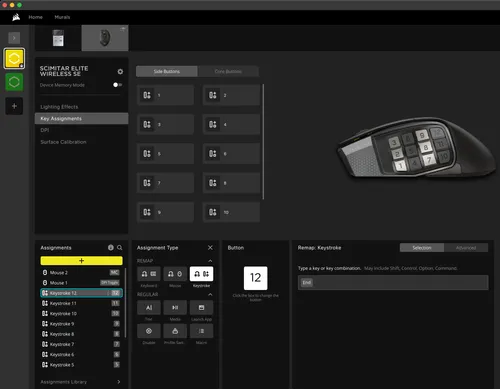
- If you want to see at a glance what your bindings are, then too bad! You have to either rename every “Keystroke 1” (and then keep it in-sync with what it’s bound to) or click each button.
- The side buttons show in two columns rather than three like the actual layout of the mouse.
-
- Other stuff
- The thumb buttons, weight, etc. are all fine for me.
- I don’t know what the battery life is going to be like.
- If this mouse is fine, then hopefully they’ll keep making hardware updates to it every couple of years and I won’t need to switch vendors yet again. Adding a ring-finger button would solve most of my problems.
- Overall:
- It’s no G600…
- Having to depend on iCUE doesn’t sound great… people online complain left and right about it.
- I paid 50 right now.
- Then again, I will probably only ever use this mouse on my own two computers, and wireless is probably going to be nice, so I’m torn.
- Giving up a dedicated “K” key is already impacting my YouTube watching, as is not having a dedicated “back” button.
Usability notes to self
Section titled “Usability notes to self”- Physical buttons:
- Hold RC, press MC: acts as though I pressed middle-click
- Double-tap RC quickly: acts as though I pressed right-click